
Evotonomia+ tutorial · Tutorial 15 of 15
Back up and restore your data
Updated on November 9, 2026Version 1.1 of the app
What is it for?
Your data lives on your phone. A backup kept somewhere else protects you if you lose, break or change your phone.
Export a backup
Open Backup from the profiles screen, or Settings then Backup and log.
Tap Export data. A file is prepared with all your data (profiles, missions, budget, notes, mood, reminders).
In the share sheet, save it somewhere of your own: the Files app, your personal cloud storage, an email to yourself.
The app then asks whether the file is safely saved: answer honestly, otherwise it will keep reminding you.
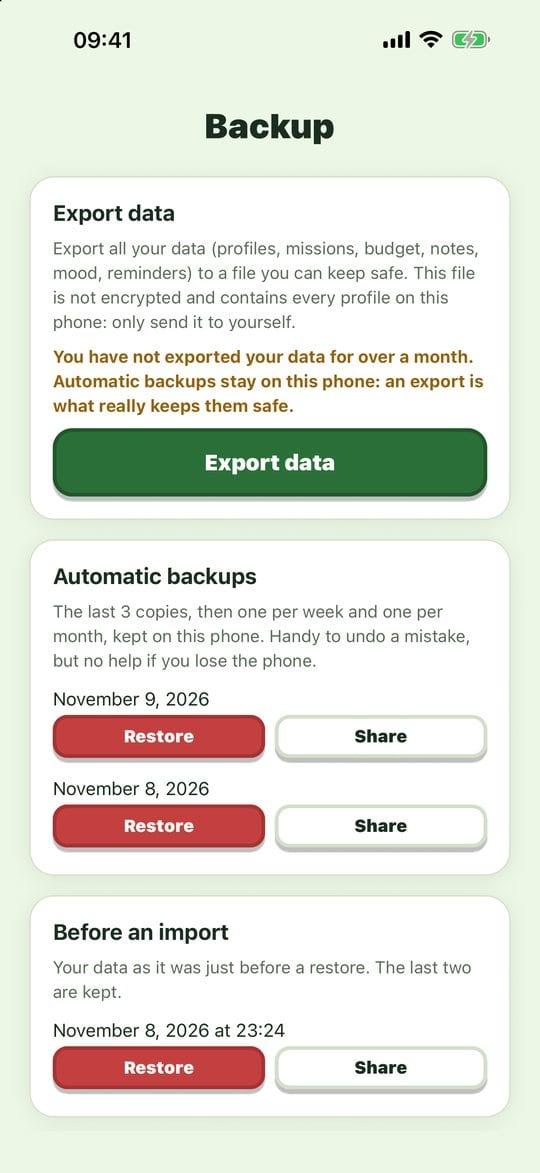
The backup screen
Important: this file is not encrypted and contains every profile on the phone. Only send it to yourself.
Automatic backups
Every day, the app keeps a copy on the phone: the last three, plus one per week and one per month. You'll find them under Automatic backups, with Restore and Share. Handy for undoing a mistake, but they disappear with the phone: exporting is what really protects you.
Restore
On the Backup screen, tap Import a backup and choose your file, or tap Restore under an automatic copy.
The app shows the file's date and the profiles it contains: check it's the right one.
Confirm. Everything is replaced by the file's content.
Before replacing anything, the app keeps a copy of your current data under Before an import: you can go back.
Changing phones
Export on the old phone, install Evotonomia+ on the new one, then import the file from the Backup screen. It also works from an iPhone to an Android phone, and the other way round. Remember to allow notifications on the new phone afterwards.
Practical tips
- One export a month is enough for most people: pick a cue (the first of the month, rent day).
- Read the confirmation carefully before importing: the date and the names tell you whether it's the right file.
Evotonomia+ is an organisation tool. It gives no medical advice and does not replace the opinion of a health professional. Understand how your data is protected