
Security and privacy
What Evotonomia+ does with your data, and what it doesn't
In the app you note your medication, your mood, your budget. Here is, in plain words, how that information is protected, and where those protections stop.
- No account, no server
- No ads, no trackers
- Data saved on the device
- You decide what leaves it
Updated in November 2026, for version 1.1 of the app.
Protections
What protects your data
No account, no server
The app creates no account and sends nothing to the publisher or to any server. Your data is saved in the app's private space, on your device.
No ads, no analytics
No advertising, no analytics tool, no crash-reporting tool. Nothing follows what you do in the app.
Measured network traffic
In November 2026, the network traffic of version 1.1 was measured on the build meant for the stores: no connection on iOS, not one byte sent or received on Android. The measurement was made on a simulator and an emulator, over a typical usage path. It does not prove everything, but it confirms what the code says.
No remote updates
The app downloads no code after it is installed. Every new version goes through App Store and Google Play review.
Discreet notifications
"Discreet notifications" mode, at the bottom of the Reminders screen, removes every name from notifications: no medication name and no mission name on the lock screen. The app offers it as soon as you create your first medication reminder.
Safety nets against loss
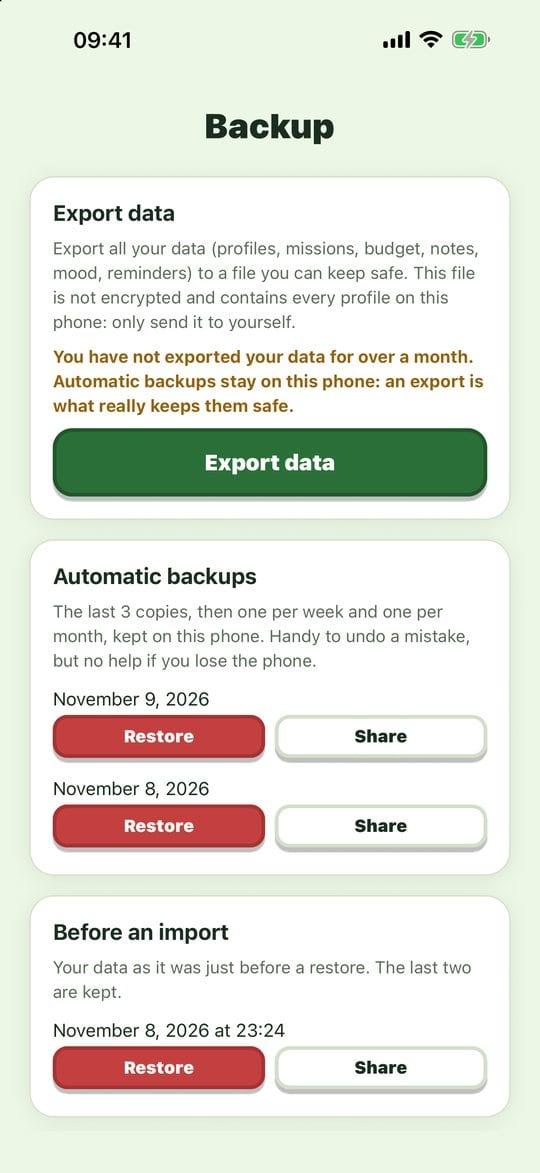
The app keeps automatic copies on the device, some of them over several weeks. Before an import, it keeps a copy of what is about to be replaced. At start-up, it checks the state of its data and offers the most recent copy if something is wrong.
Real deletion
Deleting a profile securely erases its data, and the app offers to erase the internal copies that contain it as well.
Outside Google backup
On Android, the app takes no part in Google's automatic backup: your data does not go to your Google account without your knowing.
Permissions
What the app asks of your phone
iPhone, iPad
On iPhone and iPad, you are asked for one permission only: notifications, for reminders. No microphone, no camera, no location, no contacts.
Android
On Android, the app's listing declares six technical permissions. None gives access to your photos, your contacts, your location or your microphone.
- Notifications
- To show reminders and the end of the timer. You can refuse, or turn them off later in your phone's settings.
- Phone start-up
- To reschedule your reminders after a restart.
- Waking the device
- So that a reminder or the end of a timer goes off on time, even with the screen off.
- Vibration
- For alert vibrations, which you can turn off in Settings.
- Internet and network state
- These two permissions are declared by the tools the app is built with. The app does not use them to send your data: that is what the traffic measurement described above checks.
Limits
What you should know
Honest protection also says where it stops.
No passcode of its own
The app adds no password or encryption of its own. Its protection relies on your phone's lock: someone holding it unlocked can open the app.
Profiles are not sealed off
Several people can each have a profile on one device, but nothing prevents switching from one to another. The catalogue of missions and rewards is shared by all profiles.
A readable backup file
The file you export is neither encrypted nor password-protected, and it contains every profile on the device. Keep it somewhere that belongs only to you.
Your phone's own backup
On iPhone and iPad, your data may be included in the iCloud backup or in one made on a computer, depending on your settings. The publisher has no access to it.
What you share yourself
A planner as a PDF, a month of budget, a shopping list sent as a message: these files leave the app at your request and then follow the rules of the app that receives them.
An organisation tool, not a care tool
Evotonomia+ gives no medical advice and does not replace the opinion of a health professional. A medication reminder is still only a memory aid.
In practice
Four simple habits
- Lock your phone with a passcode, a fingerprint or face recognition.
- Turn on discreet notifications if other people see your screen.
- Export a backup from time to time, and keep the file somewhere safe.
- Install updates: they also bring security fixes.
Spotted a security problem?
No software is immune to flaws. If you think you have found one, write to us: every report is read and answered.
Reference texts
The app
Don't have Evotonomia+ yet?
A one-time purchase, no subscription. The app works offline and with no account.
- One-time purchase, no subscription
- Works offline
- No account