
Evotonomia+ tutorial · Tutorial 14 of 15
Settings and reading comfort
Updated on November 9, 2026Version 1.1 of the app
What is it for?
Making the app fit you: your avatar, your language, sounds, vibrations and animations. Each setting is explained in one sentence, right under its name.
Steps
In the Menu, tap Settings (at the bottom).
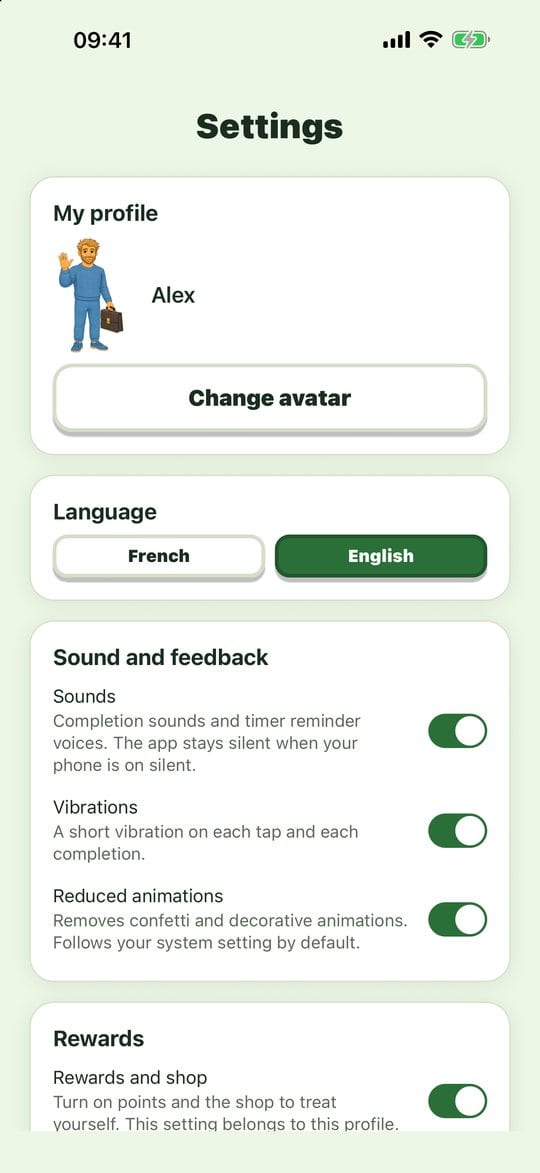
Settings My profile: tap Change avatar, then the picture you like. Two taps and it's done.
Language: French or English. The whole app switches at once. Missions you already created keep their names.
Sound and feedback:
- Sounds: completion sounds and timer reminder voices. The app stays silent when your phone is on silent. - Vibrations: a short vibration on each tap and each completion. - Reduced animations: removes confetti and decorative animations. By default, the app follows your phone's setting.
Rewards: turn points and the shop on or off for your profile.
Data and privacy: Backup and log and Legal notice. The app version is shown at the bottom.
Practical tips
- Text too small? Make the text bigger in your phone's settings: the app follows it, and its screens adapt.
- Too much movement on screen? Turn on Reduced animations.
- The app's colour changes with the emotion wheel, in the Menu (see "Mood and energy").
Evotonomia+ is an organisation tool. It gives no medical advice and does not replace the opinion of a health professional. Understand how your data is protected