
Evotonomia+ tutorial · Tutorial 1 of 15
Create your profile and take your first steps
Updated on November 9, 2026Version 1.1 of the app
What is it for?
Your profile keeps your missions, planner and reminders just for you. In three short steps, the app sets up a first day for you, with nothing complicated to fill in.
Everything stays on your phone: the app sends nothing and works without a connection.
Steps
Open Evotonomia+ and tap + Create a profile.
Type your name under Choose your name (at least two letters).
Tap the avatar that looks like you under Choose your avatar. You can change it later.

Choose a name and an avatar Tap Create profile at the bottom of the screen. To give up, the arrow at the top left takes you back to the home screen.
Welcome: read what the app promises you, then carry on.

Welcome A few missions to start with: five everyday missions are already ticked. Untick anything that doesn't apply to you, then tap Continue, always visible at the bottom.
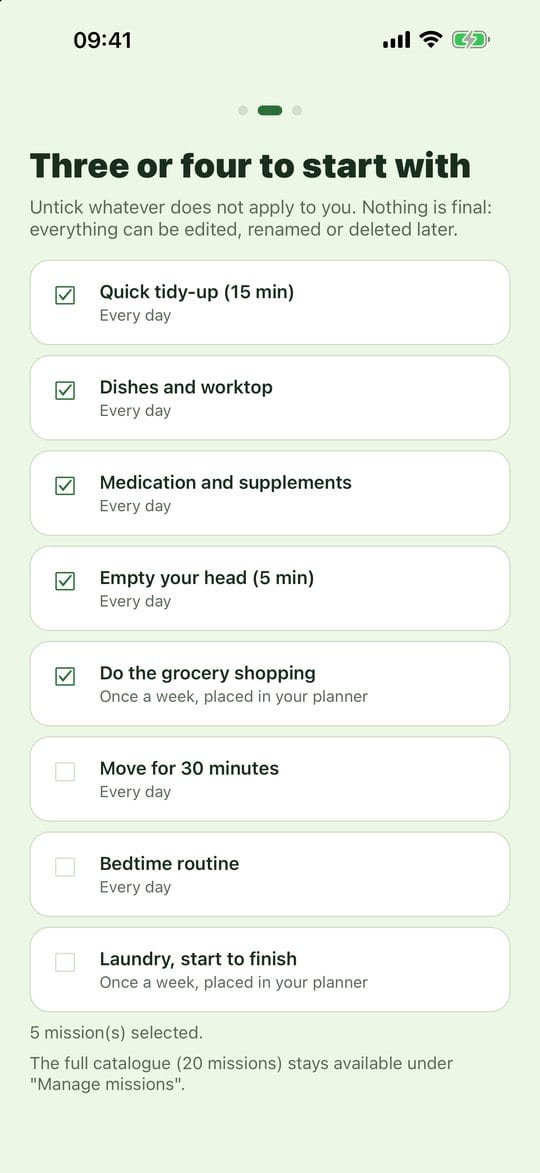
Starter missions Reminders: tap Allow reminders if you want the app to nudge you (medication, appointments, missions at a set time). Then tap Let's go.
You land on your Menu, with your first missions of the day.
Practical tips
- Start small. Two or three missions are plenty to begin with. Add more when you feel like it.
- "Later" breaks nothing. If you don't have the energy right now, tap Later: nothing is saved, and the app will offer these steps again next time.
- Nothing is final. Every mission you pick here can be edited, renamed or deleted afterwards.
- Several people on one phone? Each can create a profile from the home screen. Long-press a profile to delete it.
Evotonomia+ is an organisation tool. It gives no medical advice and does not replace the opinion of a health professional. Understand how your data is protected