Evotonomia+ tutorial · Tutorial 3 of 15
Add a mission and tick it off
Updated on November 9, 2026Version 1.1 of the app
What is it for?
A mission is something to do: the dishes, calling someone, packing your bag. Writing it down frees your head, ticking it off shows you what you have already done.
Tick off a mission
In the Menu, tap the My missions bubble. Today's missions are grouped by category, those at a set time first.
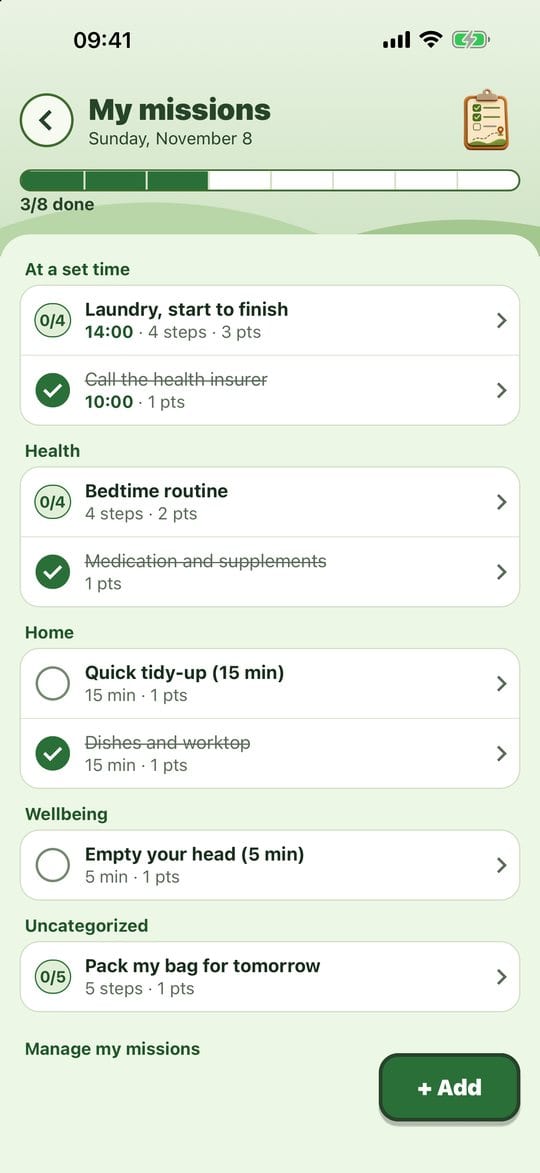
My missions Tap the circle on the left of a mission: it is done, struck through, and the bar moves on.
Got it wrong? Tap Undo in the "Done." banner that shows at the bottom for a few seconds.
A mission with steps shows something like 0/4 instead of the circle: tap it to open it (see "Steps and the guided routine").
Add a mission in a few taps
In My missions, tap + Add.
Type what you want to do under What do you want to do?.
Pick when: Today, Tomorrow, Every day, or Time to set one.

Add a mission Tap Add. A banner confirms the day, with an undo option if needed.
Tip: under the field, Already in your missions lists the ones you have created before. One tap brings one back.
Going further
- Manage my missions (at the bottom of the list): edit, turn off or delete a mission, set its category, steps or timer (More options).
- Pick standard missions (inside Manage my missions): twenty ready-made everyday missions, each one a tap away.
- Move to tomorrow (on a planned mission's screen): the mission moves to the next day, no guilt involved.
- Pick back up?: if a planned mission from the last few days wasn't done, the app offers it again. Pick it up or tap Leave.
Practical tips
- Make it small. "Clean the kitchen" is daunting, "Empty the sink" gets done.
- No confirmation, no trap: a mistake costs one tap on undo.
- Turn off rather than delete a mission you don't need for now: deleting also erases its history.
- What's done moves to the bottom of its section next time you open the list: nothing jumps under your finger while you tick.
Evotonomia+ is an organisation tool. It gives no medical advice and does not replace the opinion of a health professional. Understand how your data is protected