Evotonomia+ tutorial · Tutorial 4 of 15
Break a task into steps and follow the guided routine
Updated on November 9, 2026Version 1.1 of the app
What is it for?
A big task becomes a series of small steps. The guided routine shows you one step at a time, full screen, so there is nothing to keep in your head.
Add steps to a mission
In My missions, tap Manage my missions, then the mission to break down (or create one).
Tap More options and go to the steps.
Type your steps one by one, or tap Add ready-made steps to pick from the Step library: fourteen ready-to-use breakdowns (cleaning the kitchen, laundry start to finish, getting out of the house, opening overdue mail, getting ready for bed…).
Added steps stay editable. Adding the same pack again doesn't create duplicates.
Save the mission.
Do a mission with steps
Open the mission from My missions (it shows something like 0/4).
Tick each step once it's done. If the order is fixed, the next steps stay greyed out until the previous one is ticked: tap one and the app reminds you.
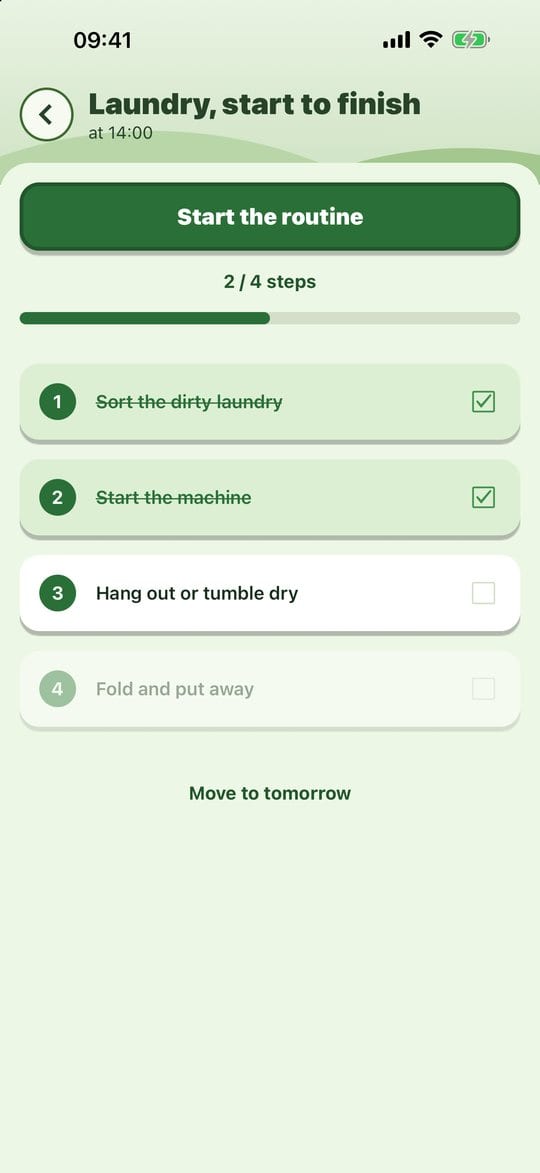
A mission with steps When every step is ticked, tap Done to complete the mission.
The guided routine
In the mission, tap Start the routine.
Only one step is shown. Tap Done when it's done, or Skip to keep it for later. If the steps have a fixed order, the button reads Later and the routine stops there: the rest waits for this step.

The routine, one step at a time At the end, the app tells you what's done and what's left, and offers to go back to the skipped steps.
You return to the mission, where you tap Done once everything is finished.
Need to stop? Leave the routine: what's done stays done.
Practical tips
- Skipping isn't failing. A skipped step isn't ticked; it comes back on the next pass.
- If a step has a timer, it never ticks anything on its own: when time is up, the app rings and waits for your tap. Nobody ticks for you while your back is turned.
- For a routine you do often (morning, bedtime), make it an Every day mission: it's ready each day.
Evotonomia+ is an organisation tool. It gives no medical advice and does not replace the opinion of a health professional. Understand how your data is protected