
Evotonomia+ tutorial · Tutorial 9 of 15
Your budget and what's left to spend
Updated on November 9, 2026Version 1.1 of the app
What is it for?
Knowing how much you have left for the month, and how much per day, without a spreadsheet. An expense takes three taps.
Note an expense
In the Menu, tap Budget, then the red Expense button.
Type the amount (the keyboard is already open).
Tap a category: Food, Housing, Leisure… The ones you use most come first.
The date is Today by default; tap Yesterday or Other date if needed.
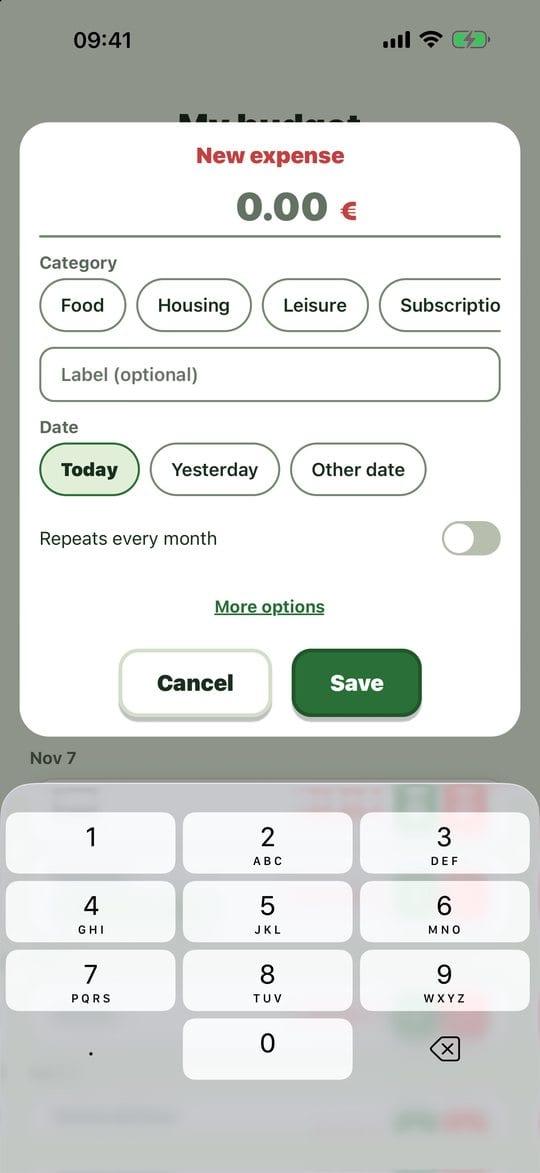
An expense in three taps Tap Save. For money coming in, it works the same way with Income.
What's left to spend
Tap Set my monthly budget and enter the amount you want to allow yourself for the month.
The top card then shows what's left to spend and roughly how much per day until the end of the month.

Left to spend The arrows beside the month let you look back at past months.
By category shows where your money goes, and opens by itself if a limit is exceeded.
Fixed costs
For rent or a subscription, turn on Repeats every month when you note the expense. It will be added automatically each month on the same date, and a banner will tell you. Delete it or untick the option to stop it.
Share the month
Share the month creates a readable PDF or a CSV file for a spreadsheet. Files created for sharing are removed from the phone afterwards.
Practical tips
- Note it straight away, at the till: three taps is less than thinking about it again in the evening.
- No need to be accurate to the penny for "left to spend" to help.
- Your budget stays on your phone: no bank is connected, nothing is sent.
Evotonomia+ is an organisation tool. It gives no medical advice and does not replace the opinion of a health professional. Understand how your data is protected