
Evotonomia+ tutorial · Tutorial 10 of 15
The shopping list
Updated on November 9, 2026Version 1.1 of the app
What is it for?
A list sorted by aisle that remembers what you usually buy: no need to write it from scratch every week.
Add items
In the Menu, tap Shopping.
Type an item in Item to add… and tap +. Type "3 tomatoes" to note three.
The item files itself under its aisle (dairy and eggs, pantry, hygiene…).
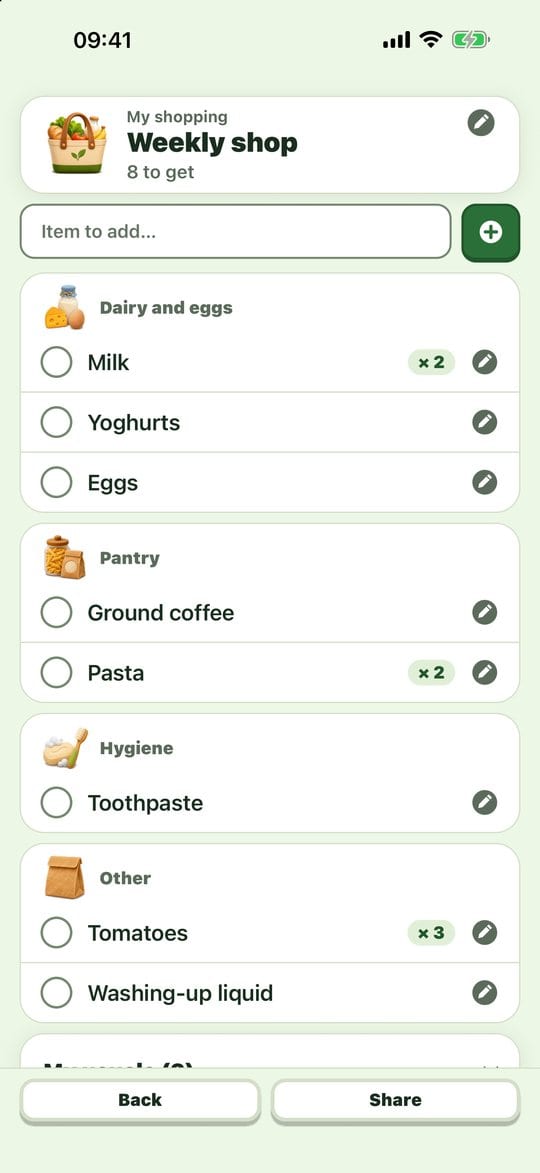
The list sorted by aisle If the item is already on the list, the app tells you instead of adding it twice.
At the shop
Tap an item's circle once it's in your trolley: it stays struck through for a moment, then moves to In the basket.
The top card shows how many items you already have.
The screen stays on for a few minutes while you tick.
Next time
Items bought on another day become My usuals. Tap a usual to put it back on the list, or Get them all again. The week's list takes a few taps.
Share
Share offers As a PDF (only what's left to get, sorted by aisle) or As a message, to send to someone who shops with you.
Practical tips
- Note it as soon as you run out, not when you're about to leave: the list fills up by itself through the week.
- Several lists (home, DIY, pharmacy): the pencil at the top opens the list menu (new list, rename, clear your usuals, delete).
- Deleting an item also drops it from the suggestions: that's on purpose, the app keeps no hidden history.
- The aisle guess is based on the item's name. An item it doesn't recognise goes under Other.
Evotonomia+ is an organisation tool. It gives no medical advice and does not replace the opinion of a health professional. Understand how your data is protected