
Evotonomia+ tutorial · Tutorial 8 of 15
Mood and energy
Updated on November 9, 2026Version 1.1 of the app
What is it for?
Noting how you feel helps you spot what helps you and what wears you out. These are markers for you: the app never says "better" or "worse".
Today's emotion
In the Menu, tap Mood & energy.
Tap a dot on the wheel: its name shows in the middle and the whole app takes on its colour. Serenity brings back the original green.
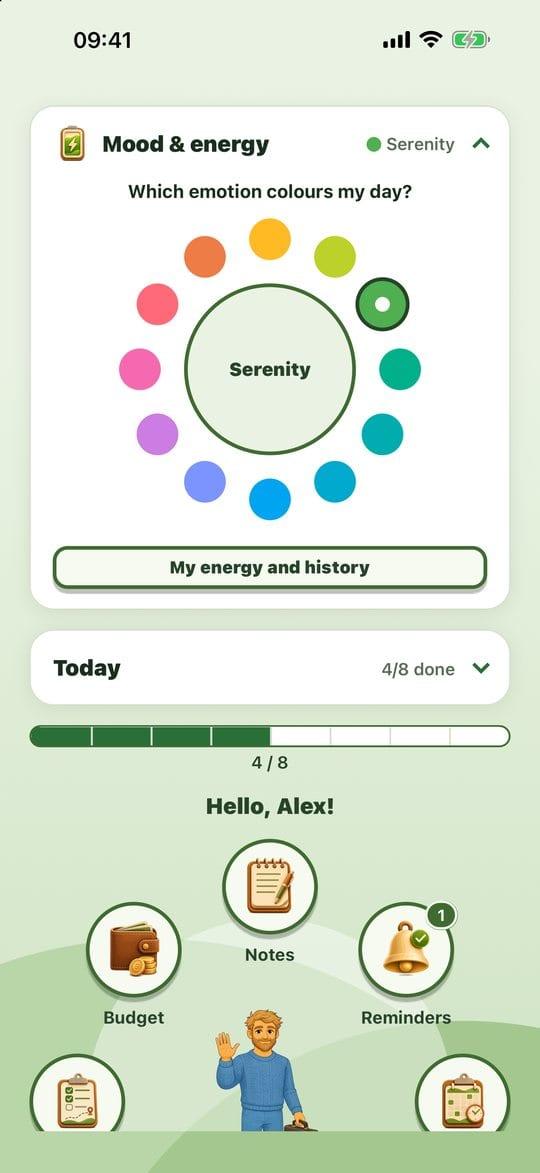
The emotion wheel
Your four gauges
Still in that panel, tap My energy and history.
Set the gauges that speak to you, from 0 to 10: My energy, My mood, My physical pain, My stress level. One tap sets the value; Clear removes it. None is required.
Add a note if you like ("Good morning, a bit tired after lunch").
That's it: what you set saves by itself, and a line under the button confirms it. The Save how I feel today button is still there if you'd rather confirm yourself.

The four gauges Further down, My trend shows one gauge over the last thirty days, and your recent days are summed up below.
Practical tips
- Leave the screen whenever you like: your gauges and your note are already saved.
- One marker a day is enough, even a single gauge. The aim isn't to fill everything in.
- 0 is a real answer: "no pain" counts, and shows in the chart.
- The chart shows, it doesn't judge: no average, no trend line, no score.
Evotonomia+ is an organisation tool. It gives no medical advice and does not replace the opinion of a health professional. Understand how your data is protected