
Evotonomia+ tutorial · Tutorial 11 of 15
Brain-dump notes
Updated on November 9, 2026Version 1.1 of the app
What is it for?
An idea, something not to forget, a thought going round in circles: put it on the notepad and your head is free. No title, no folder, no "Save" button.
Write a note
In the Menu, tap Notes. The keyboard opens straight onto the notepad page, under What's on your mind?.
Write. It's already saved as you type.
Tap the green arrow (or the return key) to put the note down: the app says "Noted. Another one?" and the page is ready for the next one.
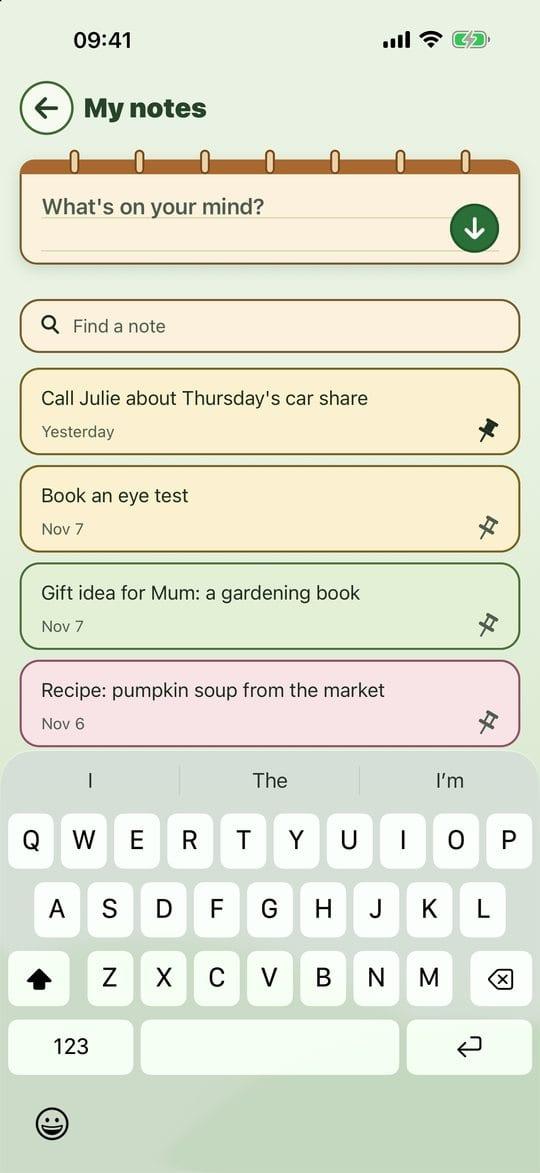
The notepad and your notes
Tidy up and find again
Tap a note's pin to keep it at the top.
Open a note to edit it or change its colour. Undo my changes puts the note back the way it was.
From six notes on, a Find a note field appears: type a word, in any order, without worrying about capitals or accents.

Finding a note
Delete
Open the note and tap Delete the note: no question asked, but an Undo banner gives it back exactly as it was if you change your mind, as long as you stay on the notes screen.
Practical tips
- Write it as it comes, even three words. What matters is getting the idea out of your head, not writing it well.
- A note that turns into a task? Add it as a mission in My missions: it gets its own tick box.
- If you leave the app mid-sentence, the sentence is waiting for you in your notes.
Evotonomia+ is an organisation tool. It gives no medical advice and does not replace the opinion of a health professional. Understand how your data is protected