
Evotonomia+ tutorial · Tutorial 12 of 15
Points and the shop
Updated on November 9, 2026Version 1.1 of the app
What is it for?
Treating yourself: every mission done earns points, which you swap for a reward you picked. It's all symbolic: no real money, no in-app purchase.
Turn on rewards
In the Menu, tap Settings.
Turn on Rewards and shop. This setting only applies to your profile.
The Shop bubble appears in the Menu. Missions done from now on earn points.
Create your rewards
Open the Shop, then Manage rewards.
Add a reward: a name ("Coffee on a terrace"), a cost in points, a stock if you want to limit it (empty means unlimited), and an icon.
Save.
Treat yourself
Open the Shop: your available points are at the top.
Tap Buy on a reward. Until you have enough points, the button stays greyed out and the app tells you how many are missing.
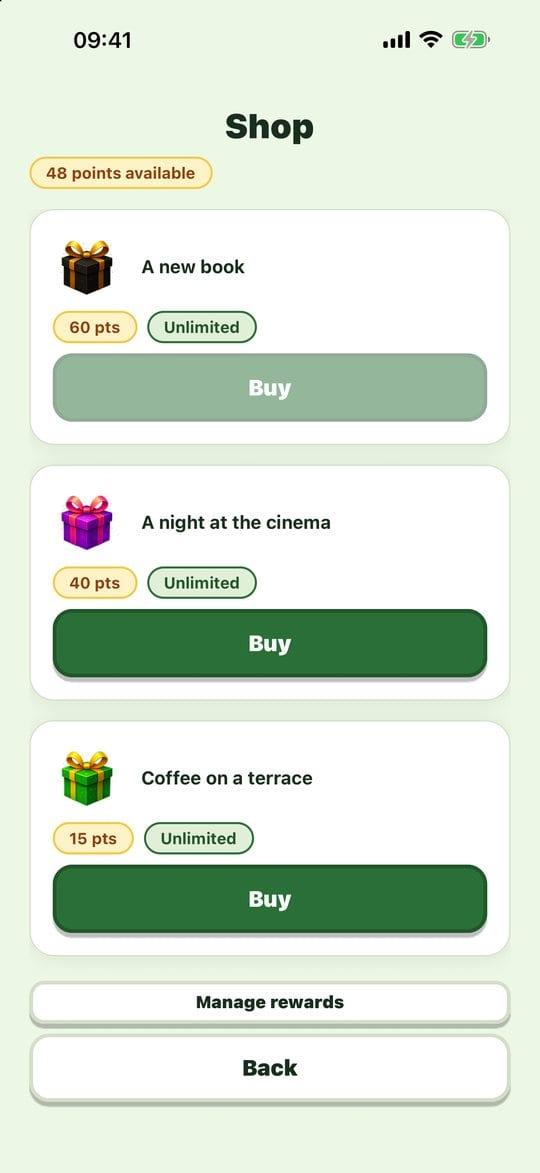
The shop Confirm: the app asks once more before spending your points, then they are taken off.
Practical tips
- Pick rewards you really want, small and easy to give yourself: an episode, a bath, a dessert.
- Reachable costs: a reward you can earn in two or three days motivates more than one that takes a month.
- Not your thing? Leave it off: the app works perfectly well without points.
Evotonomia+ is an organisation tool. It gives no medical advice and does not replace the opinion of a health professional. Understand how your data is protected