
Evotonomia+ tutorial · Tutorial 6 of 15
Plan your week and your template week
Updated on November 9, 2026Version 1.1 of the app
What is it for?
The planner puts your missions on the days of the week, with a time if you want one. The template week saves you redoing everything each Monday: it comes back on its own.
See your week
In the Menu, tap My planner.
At the top are the seven days: a filled dot means "done", a circle "to do". The arrows change the week.
Tap Week to see every day at once, Day to go back to a single day.
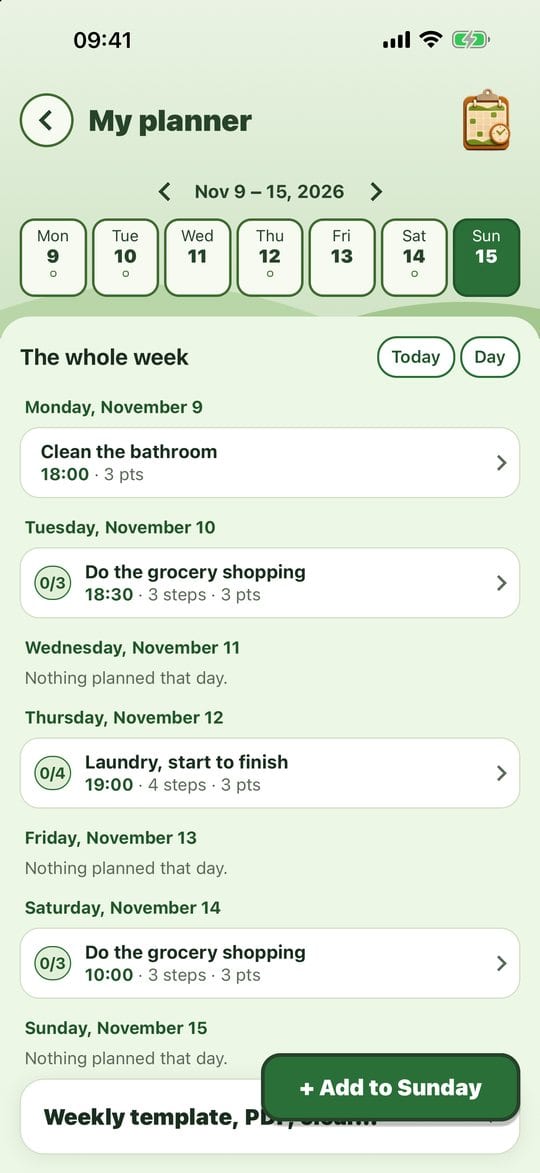
The week at a glance
Put a mission on a day
Tap the day you want in the row.
Tap + Add to that day (for example "+ Add to Tuesday").
Type a new mission or pick one from Already in your missions. A banner confirms, with an undo option.
Set a time, move, repeat
Tap the pencil next to a mission in the planner.
Pick the time with the arrows (no typing). The mission moves to At a set time, and the app will remind you at that time if you allowed reminders.
Turn on Comes back every week to add it to your template week.
You can also remove the mission from that day on this screen.
The template week
Arrange a week the way you like it.
Open Weekly template, PDF, clear… at the bottom of the planner, then tap Save as template week.
Each new week that is still empty gets these missions automatically, and a banner tells you so.
Forget the template week stops it at any time.
In the same menu: Export the week as PDF (to print or stick on the fridge), export a single day as PDF, and Clear upcoming missions (the past and what's done are left alone).
Practical tips
- Leave gaps. An overfull day is discouraging from the morning on. Three missions done beat eight left hanging.
- A week off? Clear it: the template only fills an empty week once, and doesn't come back by itself after you've removed everything.
- Every day missions don't need to be placed in the planner: they show up in My missions each day.
Evotonomia+ is an organisation tool. It gives no medical advice and does not replace the opinion of a health professional. Understand how your data is protected